How to Automate Lavu
Lavu automates the floor and the data collected there: an iPad POS, a kitchen display, MenuDrive online ordering, LavuPay processing and AI agents that mine last night's tickets. Commissions on the marketplaces, distributor prices and review pages sit outside that data, and an agent like WebRun goes and reads them.
 Written by
Julian Adeniyi
Retail operations
Written by
Julian Adeniyi
Retail operations
 Reviewed by
Nora Whitfield
Editorial lead
Reviewed by
Nora Whitfield
Editorial lead
Lavu runs the floor of restaurants nobody calls a chain
Lavu grew up as an iPad till for independent restaurants: pizzerias, bars, cafes, wineries, food trucks, the odd small group with three sites. It has grown well past a till: the same platform runs a Kitchen Display System, MenuDrive for online ordering, LavuPay for card processing, Dual Pricing, inventory and scheduling, and a set of AI agents the company puts forward as a digital management team.
What it holds is every ticket the restaurant has ever written. Items and modifiers, sent at the time they were sent. Voids, comps and discounts, with the server who applied them. Hours clocked, shifts scheduled, tips. The menu itself, and what each thing on it is supposed to cost.
The person who owns that record usually also expedites on Friday, does the ordering on Monday and answers the phone in between. That decides how much of the record ever gets read.
The same pizza is worth three different amounts
A large pepperoni sold across the counter, through your own ordering page, or through a marketplace is the same food and three different transactions.
One keeps the whole ticket. One keeps nearly all of it. One goes out with a commission taken, sometimes a promotion on top, and occasionally a refund the marketplace grants without asking. The menu price is identical in all three, so the difference never shows up in the sales report. It shows up in the bank, weeks later, as a number that is smaller than the month felt.
Working that out by hand means opening each marketplace dashboard, reading a statement written in its own vocabulary, and pulling the same day out of the POS to compare. Then again for the distributor invoice that quietly went up, and again for the weekend's reviews. Most owners do it once, find it took a whole afternoon, and never do it again.
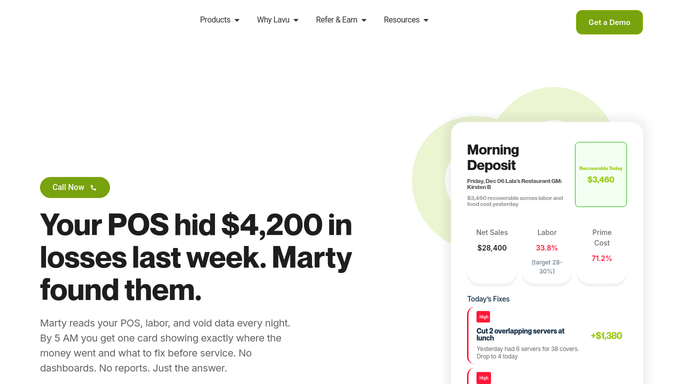
Marty finds the profit hiding in the POS data
Lavu has gone further into this than most systems its size, and any operator ignoring what is already switched on is leaving the easy part undone.
The Kitchen Display System handles course timing and gets tickets to the line without paper. MenuDrive takes online orders on your own page and auto-syncs its menu with the POS, so one edit covers both. LavuPay processes the cards, and Dual Pricing gives cash and card customers different totals at the counter. Above all of it sits Marty, with named agents for menu, labour and inventory, reading last night's data and coming back with what it thinks is recoverable.
The limit is the sentence that describes them: they read your POS data. That data ends at the edge of your own operation. The commission a marketplace charged, the refund it granted, the promotion it is still running, the distributor's price this morning, the review posted at midnight and the job ad your competitor put up on Tuesday are not in the tickets, and no amount of intelligence applied to the tickets will find them.
An order can be judged by what is left after the commission
The tickets are already in Lavu. The other half of each ticket is on a website somebody has to open, and an agent can do the opening.
Every channel costed against the same day of trade: counter, MenuDrive and each marketplace, net of commission, promotions and refunds, so the question of whether the marketplace is worth it gets a number instead of an opinion. The dishes whose ingredients moved this week, priced off the distributor's live portal against what the menu currently charges, with the ones now selling under cost named. Refunds the marketplaces granted, matched back to the tickets they came from, because three in a fortnight from the same station is a kitchen problem and not bad luck.
Then the things that never make it onto a Monday list. Comps, voids and discounts grouped by server and by hour, oldest and largest first. Guests who came in every week until March, listed with what they used to order. Reviews since Friday, sorted, with anything naming a member of staff at the top. Shifts still unfilled for the weekend, raised at the top of the week so somebody can be called round.
The menu stays the chef's, the arithmetic does not
Whether the pepperoni goes up, comes off delivery or stays as it is: that call belongs to whoever runs the kitchen. Getting to the point where it can be made costs an afternoon.
WebRun is an AI agent that works a real Chrome browser, signed in as you. It opens the Lavu back office the way you do, reads the sales, the comps and the menu, then signs into the marketplaces, the distributor's portal and the review pages and brings the two halves together.
Reading and comparing run on their own. Anything with consequences does not: a price change, an item pulled from a channel, a reply to a guest or an order with a distributor is drafted and waits for you. Runs happen on your schedule, and you can watch one and stop it.
The workflows below are already built, and each one names what it opens.
Questions people ask
Marty already works our POS data. Does this overlap?
Barely. Lavu's agents are strong on what happened at the till, because that is the data they have. This covers the sites the till never sees: marketplace dashboards, the distributor's portal, review pages. The two answer different halves of the same question about where the margin went.
Can it void a ticket or move a price?
No. It reads, compares and drafts. Prices, comps, refunds and anything a guest can see are decisions with money attached, so they wait for the owner. The most it does unprompted is put the case in front of you with the numbers already behind it.
Our online ordering is MenuDrive. Is that another login to hand over?
Yes, and that is the point. It signs into MenuDrive and each marketplace in turn, then reports them beside the POS totals, so a day of trade appears once with every channel in it rather than three times in three places.
12 ready-made Lavu workflows
Each one names the apps it touches and the exact steps it takes. Open one to read what it will do, then turn it on.





Want one of these running on your own Lavu?
Show WebRun the process once and it will run it on schedule, in your own private browser environment.