Prep tomorrow's telehealth sessions with their links
Every evening, WebRun opens Jane, reads tomorrow's telehealth appointments, drafts a reminder to each client in Gmail with their session time and secure video link, leaves every draft unsent for the front desk, and sends you a Telegram run-down of tomorrow's online sessions and any client still missing a link.
- No credit card
- Under $0.01 per run
- Cancel anytime
How do I send telehealth session reminders with video links automatically?
Every evening, WebRun opens Jane and reads tomorrow's telehealth appointments. It drafts a reminder to each client in Gmail with their session time and secure Jane video link, leaves the drafts unsent for the front desk, and sends you a Telegram run-down of tomorrow's online sessions, flagging any that are still missing a link to fix tonight.
- Tomorrow's telehealth is prepped tonight, not in the morning rush
- Each client reminder includes the right link, drafted and waiting to send
- Missing links get caught the night before, not at session time
Built for telehealth therapists · private practice owners · group practice admins · front desk teams
What does WebRun do on every run?
The exact actions WebRun takes, in order - in plain language, so you can adjust anything.
-
WebRun signs in and gets to work
Opens
jane.appin a real browser with your saved login - no setup, no API keys. -
1
Jane - read tomorrow's telehealth
jane.app How to Automate Jane
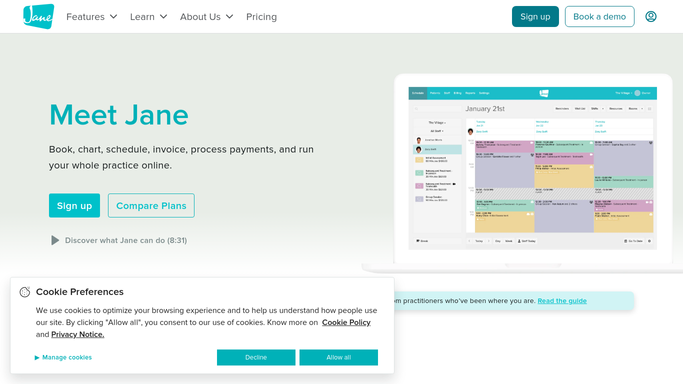
WebRun reviews tomorrow's telehealth appointments in Jane. - Open Jane and review tomorrow's appointments flagged as online or telehealth
- Capture each client, the session time, the clinician, and the secure video link
- Note any telehealth appointment that is missing its video link
Done when Every telehealth session tomorrow has been listed with its time and video link.
-
2
Gmail - draft link reminders
gmail.com How to Automate Gmail

WebRun drafts a telehealth reminder with the video link for each client and leaves it unsent. - Draft a friendly reminder to each client with their session time and secure video link
- Add a short line on how to join and what to do if they have trouble connecting
- Save every message as a draft and leave it unsent for the front desk to review
Done when A reminder draft with the right link sits ready in Gmail for each telehealth client.
-
3
Telegram - send the run-down
telegram.org How to Automate Telegram

WebRun sends you a Telegram run-down of tomorrow's telehealth sessions. - Send you a Telegram run-down of tomorrow's telehealth sessions by time
- Flag any appointment still missing a video link so it can be fixed tonight
- Note that the client reminder drafts are waiting in Gmail for review
Done when You have tomorrow's telehealth run-down on Telegram.
How is each run configured?
Secure by default
Connect once, stays signed in
WebRun signs in once and keeps each session in a persistent environment, so every run picks up right where it left off.
Every action is checked against this policy before it runs.
Questions, answered
Will it email clients their links on its own?
No. WebRun only drafts each telehealth reminder in Gmail and leaves it unsent. Your front desk reads every message, confirms the link is right, and clicks send, so nothing reaches a client without a person checking it first.
Where does the video link come from?
From Jane. WebRun reads the secure video link Jane generates for each telehealth appointment and puts it in that client's reminder draft. It never creates or alters a link, so each client gets the genuine link from your system.
What if a session is missing its link?
WebRun flags that appointment in the Telegram run-down so you can add the link in Jane before tomorrow, rather than drafting a reminder with a broken or missing join link.
Related templates
Put this on autopilot.
Turn it on in minutes - or have our team set it up for you.