How to Automate Sawyer
Sawyer automates the running of a children's activity business: automated rosters, waitlist alerts, order confirmations and reminders, payments, and a marketplace listing that updates from your own schedule. Filling the season depends on school calendars, rival timetables and listing sites, which is the part an agent like WebRun can watch.
 Written by
Devon Ruiz
Workflow engineer
Written by
Devon Ruiz
Workflow engineer
 Reviewed by
Owen Hartley
Workflow engineer
Reviewed by
Owen Hartley
Workflow engineer
Sawyer sells the class as well as running it
Sawyer is registration and management software for children's activity businesses, and the half that providers log into is called Sawyer for Business. Music schools, art studios, coding and robotics clubs, gymnastics gyms, theatre programmes and summer camps run their semesters, camps, appointments and events on it.
What separates it from the rest of this category is the other half. Sawyer also runs a marketplace where families search for children's classes and camps, and a provider can list on it. Listings update from the provider's own Sawyer schedule once they are live, so a parent browsing sees real availability rather than a description written in March. There is no upfront cost, and Sawyer takes a percentage when a family books through it.
So a business here is two things at once: an operation with rosters, instructors and a term to fill, and a listing on a shelf next to other people's listings, being compared by a parent with twenty minutes and three children.
The season is won or lost before it starts
Enrolment is seasonal and the peaks are unforgiving. Summer camp sells in the winter. The autumn term sells in August. A week that has not filled by the Monday it starts is never going to.
Which means the decisive work happens before registration opens, and almost none of it is in the software. Somebody sets camp weeks against the school district's published calendar, so the dates cover the in-service days and holiday weeks when parents actually need somewhere for their children to be. Somebody checks what the other three studios in town charge and when their registration opens. Somebody writes the same class description four times over, for the website, the marketplace listing, an Instagram post and a school newsletter.
Then registration opens and the job turns into watching. Which weeks are filling and which are not. Who came last summer and has not booked again. Which family has a form half finished or a balance outstanding. Whether the payouts that reached the bank match the enrolments that earned them.
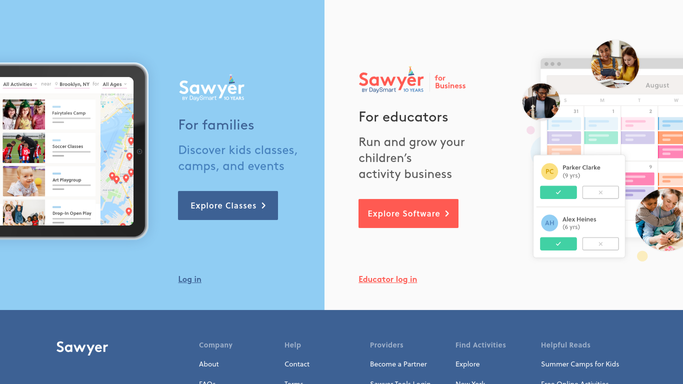
The Marketplace listing updates itself from your schedule
Sawyer automates a real amount of the running, and it is worth being clear about how much before adding anything on top.
Rosters are generated the moment an activity is scheduled and fill in as parents register, carrying allergies, birthdays and emergency contacts, and they can be printed or exported for instructors on the go. Waitlists notify families the instant a spot opens. A set of emails goes out unprompted: order confirmations, activity reminders, waitlist updates, and an abandoned cart message to the parent who got as far as checkout and stopped. Payments take card or ACH, handle refunds, coupon codes, sibling discounts and proration, and deposit to your bank within two business days. And the marketplace listing keeps itself current from the same schedule.
Every one of those runs on a family Sawyer already knows about, or an activity already in the schedule.
The parent who searched, compared three providers and picked one of the others is not in that set. Neither is the school calendar, the studio down the road, the local parenting site that lists holiday programmes, or the bank statement showing what actually landed.
The market is visible on other people's public pages
Nearly everything a provider needs in order to price and plan a season is already published, in public, on a page anyone can open.
School district calendars, with the closure days and holiday weeks that decide which camp weeks sell out and which sit at four children. The other studios' timetables and prices, read before you set yours rather than after. The listing sites and newsletters where your programme appears either correctly or with last year's dates.
Then your own shop window, seen the way a parent sees it. A camp week showing as full because a session was duplicated. A class description still carrying last term's start time. A listing that has quietly stopped appearing at all.
And inside the business: the week with six sessions and four children, flagged while six weeks remain to fill it, with the families whose child did that class last summer listed beside it. Deposits reconciled against what reached the account.
Anything aimed at a parent stays a draft. These are small communities with class group chats, and a misfired message about a missed payment is remembered for years. Prepare it, then let a person read it and send it.
The checking runs while the classes do
Those pages are public, free to read and completely useless until somebody actually looks at them. In a business this size the person who looks is usually also teaching the four o'clock.
WebRun is an AI agent that works a real Chrome browser, signed in as you. It opens Sawyer, the district calendar, the other studios' pages, the listing sites and the bank, reads each one, and brings back the comparison with the differences named.
It runs on your schedule in your own private environment, and you can watch a run and stop it at any point. Anything addressed to a family is prepared and waits for you.
The workflows below are already built, and each one names what it opens.
Questions people ask
Will it email families without asking me?
No. It prepares the message and the list, and you send. In a small parent community a badly aimed message does real damage, so anything reaching a family waits for a person.
Does this replace the Sawyer Marketplace?
No, keep the listing. This covers what the marketplace cannot see: the school calendar, other providers' pages, the other places you are listed, and the money in your bank account.
Can it read a competitor's page?
Yes, as long as the page is public. It reads what any parent comparing providers would see, which is normally the schedule, the prices and when registration opens.
13 ready-made Sawyer workflows
Each one names the apps it touches and the exact steps it takes. Open one to read what it will do, then turn it on.





Want one of these running on your own Sawyer?
Show WebRun the process once and it will run it on schedule, in your own private browser environment.