Match waitlist prospects to open units before they go to a competitor
Every morning, WebRun opens Eldermark, checks for newly vacated or upcoming vacancies, reviews the waitlist for prospects whose requested care level and room type match the open unit, ranks the top matches by wait time and care-level fit, posts an internal Slack alert to the admissions team, and saves a draft outreach email in Gmail for the admissions director to approve before any contact is made.
- No credit card
- Under $0.01 per run
- Cancel anytime
How do I automatically match senior living waitlist prospects to open units?
WebRun opens Eldermark each morning, checks for vacant or upcoming-vacancy units, and matches each to waitlist prospects by care level and room type. It ranks matches by wait time, saves a draft outreach email in Gmail for the admissions director to approve, and posts a ranked shortlist to the admissions Slack channel so no vacancy goes unfilled for lack of follow-up.
- Every new vacancy is matched to the right waitlist prospects the same morning it opens
- No outreach is sent to a family without the admissions director reviewing and approving the message
- Waitlist holds expiring within seven days are flagged before the prospect is lost
Built for senior living admissions directors · assisted living sales and marketing teams · memory care admissions coordinators · senior housing occupancy managers
What does WebRun do on every run?
The exact actions WebRun takes, in order - in plain language, so you can adjust anything.
-
WebRun signs in and gets to work
Opens
www.eldermark.comin a real browser with your saved login - no setup, no API keys. -
1
Eldermark - find vacancies and match waitlist prospects
eldermark.com
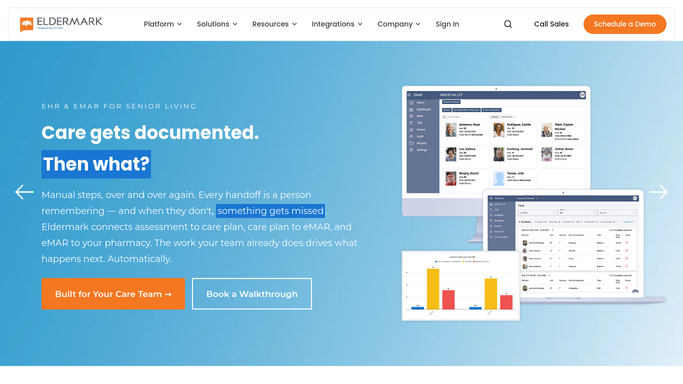
WebRun opens Eldermark to find vacancies and match waitlist prospects. - Open Eldermark and check for units with a current or upcoming vacancy in the next 30 days
- For each open unit, read the room type, care level, and floor plan
- Search the Eldermark waitlist for prospects whose requested care level and room type match the vacancy
- Rank matched prospects by wait time (earliest first) and flag anyone with an expiring waitlist hold
Done when Every open or upcoming vacancy has a ranked shortlist of waitlist matches with prospect names and contact details.
-
2
Gmail - draft outreach for admissions approval
gmail.com How to Automate Gmail

WebRun opens Gmail to draft outreach for admissions approval. - Draft a warm outreach email for the top-ranked prospect for each vacancy
- Include the room type, care level, and an invitation to schedule a revisit or discuss availability
- Save the email as a Gmail draft only, not sent, for the admissions director to review and personalise before sending
Done when A Gmail draft outreach email is saved for the top match per vacancy, ready for admissions approval.
-
3
Slack - alert admissions team with ranked matches
slack.com How to Automate Slack

WebRun opens Slack to alert admissions team with ranked matches. - Post an internal alert to the admissions Slack channel listing each open unit and its top waitlist matches
- Include prospect name, wait time, requested room type, and care level fit for each match
- Note which prospects have a Gmail draft ready for approval and flag any whose waitlist hold expires within seven days
Done when The admissions team has a Slack alert with the full match list and links to pending Gmail drafts.
How is each run configured?
Secure by default
Connect once, stays signed in
WebRun signs in once and keeps each session in a persistent environment, so every run picks up right where it left off.
Every action is checked against this policy before it runs.
Questions, answered
Will it contact waitlist prospects directly without staff approval?
No. Outreach emails are saved as Gmail drafts. The admissions director must open each draft, confirm the content and timing are appropriate, and send it themselves. WebRun never contacts a prospect on its own.
How does it rank the waitlist matches?
It ranks by wait time (earliest first) and flags any prospects with a near-expiring waitlist hold. Care-level fit and room type match are the primary filters before ranking, so only genuinely compatible prospects appear.
What if no waitlist prospects match the open unit?
If there are no waitlist matches for a given vacancy, the Slack alert notes the open unit with no matches found so the admissions team knows to consider off-waitlist outreach or marketing.
Related templates
Put this on autopilot.
Turn it on in minutes - or have our team set it up for you.