Know before standup which nightly job failed
Every morning, WebRun opens Render, checks the last run of each cron job, records whether it succeeded, how long it took and what the logs said on failure, writes the run history to Airtable, and sends a short verdict to WhatsApp naming anything that did not run.
- No credit card
- Under $0.01 per run
- Cancel anytime
How do I check that my scheduled jobs actually ran overnight?
Every morning, WebRun opens Render, checks the last run of every cron job, and records whether it succeeded, how long it took and what the logs said on failure. It writes the run history to Airtable and sends WhatsApp a short verdict naming any job that did not run.
- A job that silently stopped firing is caught the next morning
- Every failure arrives with the error line that ended the run
- Run duration history makes a slow job visible before it times out
Built for engineering teams · startups · platform engineers · solo developers
What does WebRun do on every run?
The exact actions WebRun takes, in order - in plain language, so you can adjust anything.
-
WebRun signs in and gets to work
Opens
dashboard.render.comin a real browser with your saved login - no setup, no API keys. -
1
Render - check each cron job's last run
render.com
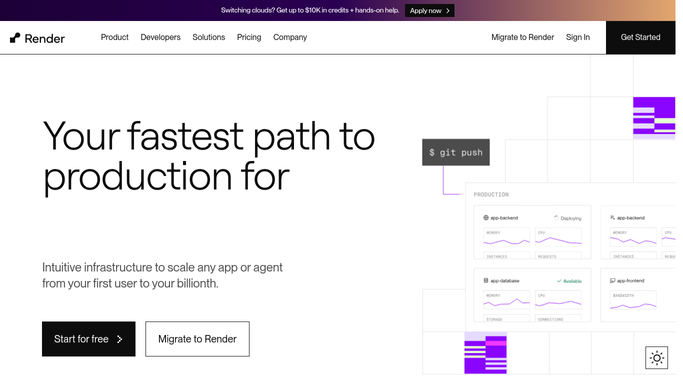
WebRun opens Render to check each cron job's last run. - Open the Render dashboard and list every cron job across your services
- For each job, read the last run: start time, status and how long it took
- Flag any job whose last run is older than its schedule says it should be, since a missing run is worse than a failed one
- Open the logs on any failure and capture the error line that ended the run
Done when Every cron job has a last run time, a status and an error line where it failed.
-
2
Airtable - log the run history
airtable.com How to Automate Airtable

WebRun opens Airtable to log the run history. - Add one row per job per day: name, service, scheduled time, actual run time, status and duration
- Compare the duration against the job's recent average and flag anything that slowed sharply
- Keep the history so a job that fails intermittently is visible as a pattern
Done when Today's runs are logged next to each job's recent history.
-
3
WhatsApp - send the morning verdict
whatsapp.com How to Automate WhatsApp

WebRun opens WhatsApp to send the morning verdict. - Send the internal engineering group a short verdict: jobs run, jobs failed, jobs that never started
- Name each failure with its error line and each missing run with its scheduled time
- Leave fixing to the engineer on duty. WebRun never re-runs a job, restarts a service, or deploys
Done when The team has the overnight verdict before standup.
How is each run configured?
Secure by default
Connect once, stays signed in
WebRun signs in once and keeps each session in a persistent environment, so every run picks up right where it left off.
Every action is checked against this policy before it runs.
Questions, answered
Will it re-run a failed job?
No. WebRun reads run history and logs only. It never triggers a job, restarts a service, redeploys, or changes a schedule, so recovery stays with the engineer on duty.
Does it catch a job that never started?
Yes, and that is the point. It compares each job's last run time against its schedule, so a job that silently stopped firing is reported alongside the ones that failed loudly.
Will it copy secrets out of the logs?
No. It captures the error line that ended a run and nothing else, so environment variables, tokens, and connection strings are not copied into the report.
Related templates
Put this on autopilot.
Turn it on in minutes - or have our team set it up for you.