Route R&D credit amount approvals to the right reviewer automatically
Every morning, WebRun opens Neo.Tax and finds engagements where a credit calculation has been completed but not yet approved. It logs each pending approval in Google Sheets, routes a Slack alert to the correct reviewer based on credit size, and drafts a client-notification email that is held in Gmail until the reviewer signs off.
- No credit card
- Under $0.01 per run
- Cancel anytime
How do I automatically route R&D tax credit approval notifications to the right reviewer?
Every morning, WebRun scans Neo.Tax for completed R&D credit calculations that have not yet been approved. It logs each one in Google Sheets, routes a Slack alert to the correct reviewer based on credit size, and stages a draft client notification in Gmail that is held until the reviewer signs off on the amount.
- Completed credit studies reach the right reviewer the same morning they finish
- Client notifications are never sent before internal approval
- Credit amounts above threshold are escalated to senior partners automatically
Built for R&D tax credit firms · CPA practices · tax advisory partners · accounting firm managers
What does WebRun do on every run?
The exact actions WebRun takes, in order - in plain language, so you can adjust anything.
-
WebRun signs in and gets to work
Opens
app.neo.taxin a real browser with your saved login - no setup, no API keys. -
1
Neo.Tax - find completed credit calculations awaiting approval
neo.tax How to Automate Neo.Tax
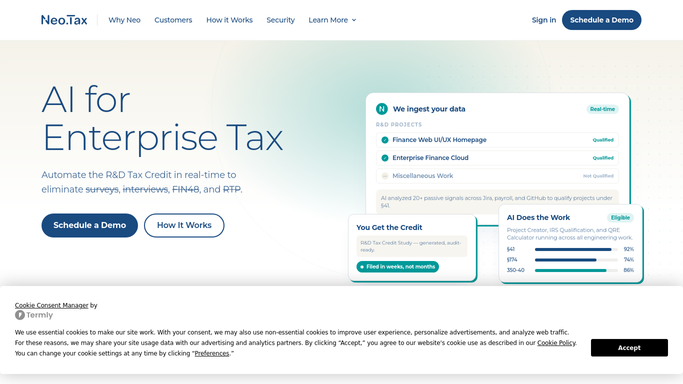
WebRun opens Neo.Tax to find completed credit calculations awaiting approval. - Open Neo.Tax and navigate to completed credit studies
- Identify engagements where the QRE calculation is complete but the credit has not received internal approval
- Capture the client name, total credit amount, engagement manager, and study completion date
Done when Every engagement with a completed, unapproved credit calculation is listed with its amount.
-
2
Google Sheets - log pending approvals with credit amounts
google.com How to Automate Google Sheets

WebRun opens Google Sheets to log pending approvals with credit amounts. - Open the approval-routing tracking Google Sheet
- Log each pending approval with client name, credit amount, engagement manager, and the appropriate reviewer tier based on dollar threshold
- Mark credits above the senior-review threshold in a separate column
Done when All pending approvals are logged with their reviewer tier assigned.
-
3
Slack - alert the correct reviewer
slack.com How to Automate Slack

WebRun opens Slack to alert the correct reviewer. - Post an approval alert to the assigned reviewer in Slack, naming the client and credit amount
- For credits above the senior threshold, alert the partner-level reviewer instead
- Include a link to the Neo.Tax study and the approval-tracking sheet row
Done when The correct reviewer has received a Slack alert for every pending approval.
-
4
Gmail - draft client notification for post-approval send
gmail.com How to Automate Gmail

WebRun opens Gmail to draft client notification for post-approval send. - Draft a client notification email summarizing the calculated credit amount and next steps
- Leave the email as a Gmail draft assigned to the engagement manager
- Do not send the email until the reviewer approves the credit amount
Done when A draft client notification email is staged in Gmail for each approved engagement, ready to send after sign-off.
How is each run configured?
Secure by default
Connect once, stays signed in
WebRun signs in once and keeps each session in a persistent environment, so every run picks up right where it left off.
Every action is checked against this policy before it runs.
Questions, answered
Will it send the credit amount to the client without approval?
No. The client notification is drafted in Gmail and held until the assigned reviewer approves the credit figure in Neo.Tax. Nothing is sent to the client before sign-off.
How does it decide which reviewer to alert?
It applies a dollar threshold you configure: credits below the threshold go to the engagement manager, credits above it are routed to a senior partner for review.
What if two engagements complete on the same day?
WebRun processes each one independently, creating a separate Slack alert and draft email for every completed study and logging both in the approval-tracking sheet.
Related templates
Put this on autopilot.
Turn it on in minutes - or have our team set it up for you.