Follow up with every tour for you
Every evening, WebRun opens ECP, finds every community tour completed that day, drafts a personalized thank-you and next-steps email for each family in Gmail, and logs the follow-up status in a Google Sheet so your admissions team always knows who still needs a reply.
- No credit card
- Under $0.01 per run
- Cancel anytime
How do I automatically follow up with every assisted living tour?
WebRun reviews ECP every evening for tours completed that day, drafts a personalized thank-you and next-steps email for each family in Gmail, and logs the status in Google Sheets. Every draft waits for your admissions team's review before sending, so no toured family goes a day without a follow-up.
- Every toured family gets a same-day, personalized follow-up draft
- No tour follow-up sits unsent for more than a day
- Admissions reviews ready drafts instead of writing every follow-up from scratch
Built for assisted living admissions directors · senior living sales counselors · memory care admissions teams
What does WebRun do on every run?
The exact actions WebRun takes, in order - in plain language, so you can adjust anything.
-
WebRun signs in and gets to work
Opens
www.ecp123.comin a real browser with your saved login - no setup, no API keys. -
1
ECP - find tours completed today
ecp123.com How to Automate ECP
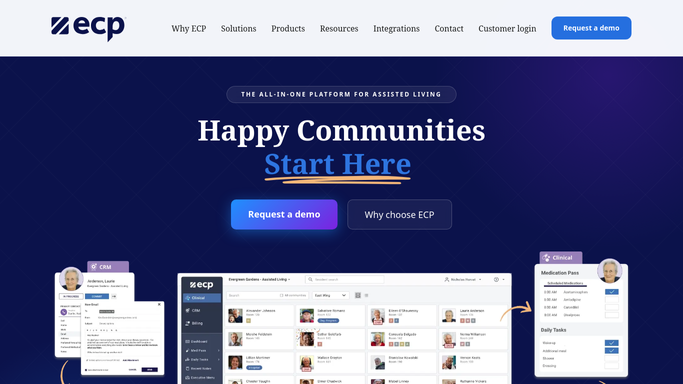
WebRun opens ECP to find tours completed today. - Open ECP and pull every tour marked completed today
- Capture the prospect's name, contact, family member, and tour notes
- Note any specific concerns or questions raised during the tour
Done when Every completed tour today is listed with its contact and notes.
-
2
Gmail - draft a personalized follow-up for each family
gmail.com How to Automate Gmail

WebRun opens Gmail to draft a personalized follow-up for each family. - Draft a personalized thank-you email for each family, referencing their specific tour notes
- Include clear next steps such as a follow-up call or a deposit deadline
- Leave every draft unsent in Gmail for your admissions team to review and send
Done when A reviewable draft exists for every family toured today.
-
3
Google Sheets - log follow-up status for each tour
google.com How to Automate Google Sheets

WebRun opens Google Sheets to log follow-up status for each tour. - Open the tour follow-up tracker in Google Sheets
- Log each family's tour date and draft status
- Flag any family from a prior day whose draft is still unsent
Done when The sheet shows every recent tour and whether its follow-up has gone out.
How is each run configured?
Secure by default
Connect once, stays signed in
WebRun signs in once and keeps each session in a persistent environment, so every run picks up right where it left off.
Every action is checked against this policy before it runs.
Questions, answered
Will it email families without anyone reviewing it first?
No. Every follow-up is drafted in Gmail and left unsent. Your admissions team reads and sends each one, so nothing goes to a family without a human review.
How personalized is each draft?
It references the specific notes from that family's tour, such as questions asked or concerns raised, instead of a generic template.
What happens if a family toured a few days ago?
The Google Sheets tracker flags any tour whose draft is still unsent after a day, so a busy week never lets a family slip through.
Related templates
Put this on autopilot.
Turn it on in minutes - or have our team set it up for you.