Keep every client's annual review on schedule
Every Monday, WebRun opens ComplySci to check each client's last completed annual compliance review against the Rule 206(4)-7 12 month requirement, flags anyone due within 60 days, logs the schedule in Google Sheets, and holds an open slot on the assigned reviewer's Zoom calendar before the due date.
- No credit card
- Under $0.01 per run
- Cancel anytime
How do I keep every RIA client's annual compliance review on schedule?
WebRun checks each client's last completed annual compliance review in ComplySci every Monday, flags anyone due within 60 days of the Rule 206(4)-7 deadline, and logs the schedule in Google Sheets. It also holds an open slot on the assigned reviewer's Zoom calendar before the due date, so every client's annual review gets scheduled with time to spare.
- Every client's annual review is flagged 60 days out, not the week it's due
- A review slot is already held before your team even reaches out
- Nothing gets scheduled with a client without your team's review
Built for investment adviser compliance consultants · outsourced chief compliance officers · RIA compliance teams · compliance consulting firms
What does WebRun do on every run?
The exact actions WebRun takes, in order - in plain language, so you can adjust anything.
-
WebRun signs in and gets to work
Opens
app.comply.comin a real browser with your saved login - no setup, no API keys. -
1
ComplySci (COMPLY) - check each client's last review date
comply.com How to Automate ComplySci (COMPLY)
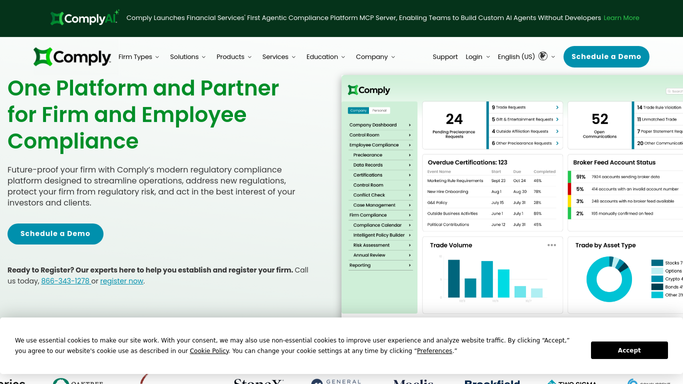
WebRun opens ComplySci (COMPLY) to check each client's last review date. - Open ComplySci and pull the date of each client's last completed annual compliance review
- Calculate days remaining against the 12 month Rule 206(4)-7 requirement
- Flag any client due within 60 days
Done when Every client's annual review due date and days remaining is confirmed.
-
2
Google Sheets - log the review schedule
google.com How to Automate Google Sheets

WebRun opens Google Sheets to log the review schedule. - Open the annual review schedule tracker
- Add each client due within 60 days with their due date and assigned reviewer
- Mark any review already completed this cycle as done
Done when The schedule tracker reflects every client's current review status.
-
3
Zoom - check the reviewer's availability
zoom.us How to Automate Zoom

WebRun opens Zoom to check the reviewer's availability. - Check the assigned reviewer's Zoom calendar for open slots before the client's due date
- Hold the earliest available slot for the review
- Leave the actual meeting invite to your team to send
Done when An open review slot is held for every client due within 60 days.
How is each run configured?
Secure by default
Connect once, stays signed in
WebRun signs in once and keeps each session in a persistent environment, so every run picks up right where it left off.
Every action is checked against this policy before it runs.
Questions, answered
Does it conduct the annual review itself?
No. WebRun only flags who's due and holds a meeting slot. Your compliance officer conducts the actual Rule 206(4)-7 annual review.
How far ahead does it flag a client?
60 days before their review is due, based on the date of their last completed review in ComplySci, so there's time to schedule before it's urgent.
Does it send the meeting invite?
No. WebRun holds an open slot on the reviewer's Zoom calendar. Your team sends the actual invite, so nothing lands on a client's calendar without your review.
Related templates
Put this on autopilot.
Turn it on in minutes - or have our team set it up for you.